Get Started With Paint.NET

Dave Johnson, PC World

I routinely use high-powered photo editing programs like Adobe Lightroom, Adobe Photoshop, and Corel Paint Shop Pro. But you can get away with spending a lot less on photo editing software. You can spend nothing at all, in fact. In the past I've mentioned GIMP--a popular free, open source program. This week, I'll show you how to get started with Paint.NET as well.

Paint.NET got its start as a senior design project at Washington State University, where it was envisioned as a replacement for the Paint program in Windows. It has evolved significantly since then, though. It remains free, and today has all the basic rudiments of photo editing programs, like layers, effects, and even support for Photoshop-like plug-ins. You can download the latest version of Paint.NET from PCWorld, but you'll want to bookmark the official Paint.NET Web site as well, since there are forums, tutorials, and plug-ins available there. (You can also get to the Web site from Paint.NET's help menu.)

A Quick Tour

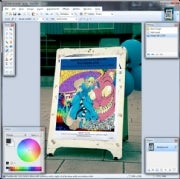
The interface should look pretty familiar to anyone who has used a program like Photoshop or Paint Shop Pro. Nothing, though, is locked in place. The standard toolbar, for example--usually located on the left side of the screen--can be moved around anywhere in the program window. In fact, if you don't maximize the Paint.NET window, you can drag toolbars and tool palettes out of the program window completely.

The toolbar has all the basics. You'll find selection tools, a magic wand, and a clone tool, for example. When you choose a tool, look at the toolbar at the top of the screen for options to customize it, such as controlling the size of the brush. But making a complex selection with Paint.NET can be tricky, since there's no "magnetic" selections--just a freehand lasso.
As you make changes to your photo, you might notice the Undo window at the top right. It tracks everything you do, so you can undo edits one at a time, or undo a slew of actions all at once--all the way back to the first thing you did to the photo, if you want to.

Working With Layers
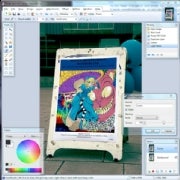
Like any full-featured photo editor, Paint.NET gives you the ability to combine photos using layers. There isn't an "adjustment layer" tool for making edits to a photo, but you can simulate Photoshop-like adjustment layers pretty effectively. Just duplicate your photo in a new layer (choose Layers, Duplicate Layer) and then choose one of the options from the Adjustments or Effects menus. You can choose Adjustments, Curves, for example, and tweak the photo. Then, in the Layers palette at the bottom right of the screen, click Properties and use the slider to adjust the opacity of the top layer. (Note that Paint.NET uses the geeky range of 0-255 instead of 0-100, but the effect is the same.)

Play With Plug-Ins

You can use plug-ins to add a wealth of new capabilities to Paint.NET. To get to plug-ins, choose Help, Plug-ins from the menu in Paint.NET, which opens your browser to the Paint.NET Web site's plug-in page.
For example, if you shoot using your camera's RAW mode, the first plug-in you'll want to install is a RAW plug-in so you can open those images in Paint.NET. To get to that quickly, choose Plugins Index, show the Alphabetical List of Plugins Q-Z, and scroll down to the entries for RAW tools. There are a few to choose from, but I've had the best luck with RawReader. To install it, download the RawReader zip file, which contains three DLL files. Then open the program location for Paint.NET (probably c:\program files\Paint.NET) and drag those DLLs to the folder called FileTypes. Restart Paint.NET and you should be able to open most RAW files. Installing any plug-in is basically that easy--just drag the DLL to the Paint.NET folder or one of its subfolders like Effects or FileTypes.


SOURCE :pcworld.com
Read More!

Five Reasons It's Time to Switch to Windows 7

Support for Windows XP SP2 ends tomorrow-- time to consider a 
switch to Windows 7.
1. Hardware Support. Windows XP is archaic, and it is designed to run on outdated hardware. As new technologies are introduced, it is unlikely that Windows XP will be compatible or able to take advantage of them. Windows 7 provides support for multitouch displays, and also has greatly improved memory and power management features.

2. Improved Drivers Installation. Windows 7 has a superior system for automatically detecting and installing drivers. Windows XP sort of has this capability, but more often than not the search for drivers yields nothing and requests that you insert a driver disc from the vendor. Install a new piece of hardware in Windows 7, and most of the time it will automatically be added along with the correct driver without any additional user interaction.

3.Security. Windows XP lacks many of the crucial security controls that have been introduced in Windows Vista and Windows 7. Looking at the vulnerabilities that have been discovered since the launch of Windows 7, the Windows 7 operating system is frequently unaffected, or when it is affected by the same flaw as Windows XP, the result of an exploit is minor while the Windows XP system will be completely owned by the attacker.

4. Performance. One of the complaints against each new generation of Windows is that it seems to get slower and more bloated with each iteration. Windows 7 certainly adds new features--some of which may be frivolous or unnecessary--but it manages to boot faster and run snappier than its predecessor--Windows Vista. Windows XP users should not experience any significant lag in boot time or performance, and some may even see an improvement over XP.

5. XP Mode Virtualization. This is the Windows 7 trump card. With Windows XP Mode virtualization, Windows 7 runs a full Windows XP SP3 system in a virtual PC. It enables you to continue using hardware and software that are not compatible with Windows 7 from within the Windows 7 operating system. And, XP Mode virtualization is fast--somehow much faster than other Microsoft virtual PCs I have created. The caveat for this feature, though, is that it is only available on Windows 7 Professional, Ultimate, and Enterprise.
Granted, moving to Windows 7 may not be cheap for some businesses. Many are running Windows XP on hardware that is more or less obsolete by today's standards, which means upgrading to Windows 7 must include replacing the hardware as well.

Windows 7 is not the only solution, though. As I stated up top--companies can simply upgrade from Windows XP SP2 to Windows XP SP3 and still have Microsoft support through 2014. It is also possible to migrate off of Windows XP SP2 by switching to some variation of Linux rather than moving to Windows 7. The XP hardware would most likely support it, but IT admins must also consider the learning curve of adopting a new OS culture--both for the users and for the technicians that have to support the desktop environment.


SOURCE:pcworld.com
Read More!

IE9 Preview Delivers New Features and Impressive Performance

Microsoft is progressing to the next phase of Internet Explorer 9 (IE9) development today with the launch of Platform Preview 3 (PP3) of the next generation Web browser. Developers can download the latest preview to get a sneak peek at what's in store with IE9 and what new functionality Microsoft is incorporating.

IE8 is the reigning king among Web browsers--it leads in market share and in market share growth rate--but, IE9 is generating considerable interest. The IE9 Test Drive site has had more than 16 million visitors, and Microsoft reports that the IE9 Platform Preview has been downloaded over two million times.

With the latest release of the IE9 preview, the Microsoft developers have added support for HTML5 Canvas, and HTML5 audio and video tags. The new HTML5 functionality enables IE9 to deliver interactive content and online video on compatible browsers--similar to what you might expect from Adobe Flash, but without the need for any third-party application or browser plugins.

I spoke with Rob Mauceri, principal group program manager for Internet Explorer at Microsoft, and he walked me through the improvements and capabilities of IE9. Microsoft also put together a short video you can watch, demonstrating some of the capabilities of the IE9 PP3. The video shows some joint development effort with IMDB, and with Amazon illustrating how seamlessly IE9 can scroll through the available options and play video clips natively within the browser.


Aside from fun bells and whistles, this latest release in the IE9 development process shows off some speed and performance improvements as well. According to the SunSpider benchmark test, IE9 PP3 comes in at 347 milliseconds overall--outperforming both Chrome 4 and Firefox.

IE9 also includes support for CSS3 Font Face and Web Open Font Format (WOFF)--rendering a wider range of fonts with better clarity. The IE9 demo video shows a page in IE9, and a similar page rendered in the Google Chrome Web browser in which the fonts are all jacked and misaligned. The Acid3 score for IE9 has gone from a 68 with PP2 to an 83 with PP3.

IE9 combines the Chakra JavaScript engine, with support for multicore CPUs, dedicated GPUs, and hardware video acceleration to deliver exceptional performance. Microsoft is able to deliver flawlessly smooth animation at very high frame rates with IE9. Throughout the demo video, Microsoft does side by side comparisons demonstrating how IE9 looks and performs compared with competing browsers, and the results appear to be compellingly in Microsoft's favor.

I asked about an ETA for a public beta of IE9. Mauceri was predictably elusive--essentially saying that Microsoft is working as fast as it can, but is also focused on ensuring a quality product and is not prepared to announce availability dates which might force developers to march to the beat of artificial deadlines that could compromise quality or performance.


SOURCE:PCWORLD.COM


Read More!

How HTML5 Will Change the Web

Many folks who are just tuning into the HTML5 saga because of the battle between Adobe and Apple are surprised to learn that the push to create a fifth official version of the HTML specification began six years ago. And that's just the first half of the story because the latest implementations, while nice, are far from standards. The HTML5 demos from Apple, for instance, are impressive, but they only run well on Safari.

That's how slowly committees can work. The browser creators and other stakeholders have a big collection of ideas for improving the browser and the Web, and these are gradually coalescing into a fifth generation for the standard. But agreement takes time. Many of the new tags and JavaScript functions exist already as experiments on some of the browsers, but interoperability and standardization are still to come. That's why the Flash groupies joke about HTML5 being a time machine to take you back to 2000.

While the jokes may sting and waiting for more general adoption is tiresome, it would be a mistake to simply ignore HTML5. There are not only powerful companies behind it, but there's also the standard process of technological development. The software -- both browsers and tools -- tends to absorb all of the orbiting extras, incorporating them into the main standard.

HTML5 will change many aspects of life on the Web. It will not displace Flash or Shockwave: One glance at the games on Miniclip.com, such as Jet Ski Racer, shows how much ground the HTML5 committee must cover. But HTML5 will still remake the Web and enable basic Websites to do much more -- from tracking our location to storing more of our data in the cloud. HTML5 tags will displace plug-ins for simpler jobs, at least some of the time, and it will open up advanced capabilities to a larger audience. It might even make the Web more secure, more efficient, and more adaptable.

To see where this new standard may take us, I collected the opinions from a number of developers, programmers, and designers. Here is an unordered list of ways that the Web may change as HTML5 is gradually adopted and standardized.

HTML5 will reduce the importance of plug-ins HTML5 will enable more interactive graphics HTML5 will allow applications to tap local file storage HTML5 will simplify scraping with cyborg data HTML5 will add location to the mix HTML5 will smooth the way to Web video HTML5 will produce chattier widgets HTML5 will improve security (maybe) HTML5 will simplify Web development

HTML5 will reduce the importance of plug-ins Once upon a time the Web world liked the idea of a browser plug-in or add-on because it encouraged creativity and experimentation. Sounds, moving pictures, and other neat tricks appeared on the Web first through plug-ins built by Sun, Adobe, RealAudio, Microsoft, and many others. The plug-in interface was open to all, and everyone experimented with adding new features to the old, text-based world.

The battle over Flash may be the most famous skirmish, but the newer expanded powers of HTML5 also threaten other coding silos. JavaFX may be wonderful, but who wants to learn another syntax when JavaScript and the Canvas object will do the job? Who needs the Real ecosystem when the video tag will synchronize audio and video? Plug-ins like these are destined to be forgotten.

Will the idea of a plug-in disappear or fall into disfavor? Perhaps, but it depends on what you want to do. If drawing images is your goal, then the Canvas object may be powerful enough. But if you want to build specialized 3-D worlds like the ones found in the more sophisticated Flash and Shockwave games, you may be pining for the old days when a plug-in could get direct access to the video hardware or run a 3-D game world.

HTML5 will enable more interactive graphics The old Web loaded images by downloading a GIF or a JPG file. The new Web can build an image on the fly in a Canvas object. A number of good graphing libraries have appeared, and all of them make a Website's graphics much more interactive.

Now the JavaScript layer can compute values and draw pictures with the data. Everything can become more alive and much less textual -- if the developer has the time and talent to create the solutions. Adobe is just beginning to make it simpler to develop sophisticated graphics for HTML5. The emergence of such tools will unlock additional capabilities, and the sophistication of the graphics will only improve as the tools mature.

There is a legitimate danger that all of this sophistication will overwhelm the poor client-side processors. In the past, some developers deliberately disabled the Flash plug-in to avoid the headaches and overhead of rendering heavy Flash content. That won't be an option in the future. Everyone who's been complaining about Flash may learn that the troubles had little to do with the technology itself -- the problems came from the designers battling for our attention.

HTML5 will allow applications to tap local file storage Web programmers have always been able to store a surprisingly large amount of information in cookies (300 cookies of up to 4,096 bytes in IE), but to do real work you need more room. The early versions from the Dojo toolkit used the Flash plug-in to commandeer a section of the hard disk, but now the tools can simply use HTML5.

This storage can be used for anything the programmer wants, including undermining the entire cloud paradigm by storing data locally on the hard disk. This makes it possible to deliver and install applications that behave just like classic applications. Applications load their JavaScript code from the HTML5 offline application cache and start right up whether or not the Web connection is working.

The technique does not need to undermine the hard work of cloud proponents, though, because the local databases can act like smart caches. Game programmers might store descriptions and artwork locally, saving the time of downloading the information again and again.

On the downside, these databases are buried deeply in the system folder, so making backups may not be the simplest step. Users who may want to move their local data from machine to machine will pull out their hair. Or perhaps we'll just see a hybrid cloud/local approach appear where the local machine caches the data but the cloud maintains a definitive version that can be accessed from different machines.

HTML5 will simplify scraping with cyborg data Anyone who's scraped data from Web pages knows that the structure offered by HTML does little except tell the browser where to place the information. There's no insight into the data itself, something that would help a programmer make sense of the information. The so-called microformats in HTML5 provide a mechanism to introduce more sophisticated markup into the HTML that makes it easier to analyze the data.

No one can predict just how much change the microformats will bring to the Web, but it's easy to see how they will empower programmers to whip together solutions. If there's one nice, standard way to represent dates and times, for example, then programmers can knit together the time-related information from Websites without bothering to write sophisticated parsers that guess at the format one person chose. Calendars, timelines, and schedules drawn from multiple sources become much simpler to craft.

HTML5 will add location to the mix To the Web server, we were once just IP addresses, relatively anonymous numbers that had only a rough correspondence to the real world. The HTML5 standard now lets JavaScript ask the browser for the latitude and longitude of the user. It typically doesn't work with a desktop system (GPS or Wi-Fi required), but it works quite well with handheld smartphones.

No one knows what clever programmers will create with this location information, but it's bound to integrate cyberspace with meatspacein unpredictable and amazing ways.

HTML5 will smooth the way to Web video The HTML5 video tag makes it easier for Web developers to integrate video with the information on the rest of the page, opening up the bag of tricks to jQuery and PHP developers, not just Flash, Silverlight, or JavaFX magicians.

Despite this vision, there's little coherence, as everyone wants to be the ones distributing the codecs for unpacking the moving images and the corresponding sound. The HTML5 standard is codec-neutral, which means that we're replacing the old world where the add-on software was called a plug-in with a new world where the add-on is called a codec. So there's a standard video tag, but the browser may or may not know how to interpret the data.

Erich Ocean, a HTML5 application development lecturer who teaches in Los Angeles, believes the codec wars are already won. "Computer programmers (and Mozilla) are fooling themselves if they think they can dictate video standards to video professionals," he said. "Google's new format will see some usage, for example in YouTube, but will never reach anywhere close to the ubiquity of H.264."

Despite the confusion and the lack of complete agreement, the new video tag will unlock more of the power of video and make HTML less and less of a textual jungle and more and more of a video playground. It's too soon to stop teaching our kids to read, but maybe the handwriting -- er, the Webcam video is projected on the wall.
 
HTML5 will produce chattier widgets The widgets that run in IFrames have enabled sites to embed information from other sites for years, but they've always been limited by the security boundaries that keep each widget in a separate sandbox.

HTML5 offers a standard mechanism for these widgets to talk with each other. They still won't be able to reach into each other's sandbox, but they'll be able to send messages back and forth, coordinating their work and maybe even gossiping about the person typing at the keyboard.

Advertisers will drool at the chance to coordinate the behavior of disparate rectangles scattered across the page, and developers will surely find other practical uses. For instance, a tennis tournament might synchronize players on the left and the right of the page, an effect that may be so maddening that some will go running back to HTML 1.0.

However, this mechanism for sending messages is just a start. There's still a need to set standards for the information that's passed, so widgets stand a chance of speaking to each other even when they haven't been developed with a specific conversation in mind. In other words, they need more of a standard vocabulary.
 
HTML5 will improve security (maybe) Each browser plug-in is a separate program built by a different team of programmers with different standards, different release schedules, and different models for security. Naturally, some plug-ins are more secure than others. And as plug-ins proliferate they increase the complexity of keeping track of the security faults. Was it the plug-in or the browser that had that nasty hole at the end of last year? Was it fixed by updating the browser but not the plug-in or vice versa? Who can remember?

Replacing many plug-ins with features baked into HTML5 removes the dangers that any of these groups will make a mistake, or worse, that someone will use a plug-in API to deliberately install malicious code. If the security team auditing Firefox, Chrome, or IE does the job -- granted, that's a big if -- then the dangers will be fewer.

This claim of better security, though, is a bit of a wild guess. The devious minds may use their malice aforethought to take advantage of the nice integration, perhaps drawing PayPal logos with the Canvas object from scratch to impersonate the PayPal site. No one can predict what the dangerous minds will discover in the new capabilities of HTML5.
 
HTML5 will simplify Web development Bill Mill, a developer who works at Lookingglass Cyber Solutions, explains the change succinctly: "I mainly like HTML5 because it allows me to work in one unified environment, the browser plus JavaScript plus DOM, without having to switch back and forth between the Flash world and the HTML5 world. There is one language and one set of tools, not different ones for each plug-in."

He adds, "I think this is noticeable to the user too, where Flash blobs seem to exist in their own world within a Web page."
HTML5 offers one language (JavaScript), one data model (XML and DOM), and one set of layout rules (CSS) to bind text, audio, video, and graphics. The challenge of making something beautiful is still immense, but it's simpler to work with a unified standard.
Now, if only HTML5 came with the nice collection of tools that Adobe makes for Flash.


 SOURCE:pcworld.com


Read More!

Facebook, Google Vie for Connect Services

One hour after Google did a public launch of Google Friend Connect, Facebook launched Facebook Connect. The simultaneous launch is not a coincidence -- the two competing services are battling for mindshare as they strive to be the frontrunners in data portability.

facebook, connect, social networking

The companies want users to be able to use their Google and Facebook logins to enter third-party sites. It benefits users and third-party sites and allows Facebook and Google to collect more information about what users are doing online.

google, connect, social network, opensocial

There are some key differences between the services. Google's service uses OpenSocial. This means sites using Google Friend Connect can use OpenSocial's open-source applications, such as message boards and ratings gadgets. Google also lets users sign in with their Yahoo!, AOL and MSN usernames.

It's also easier for site owners to use. Google requires adding a few "snippets of code to your site," Stan Schroeder at Mashable reported. However, "adding Facebook Connect apps is a much more convoluted process," he said.

However, Facebook has an advantage in terms of partnering with large third-party services. Facebook Connect is already working with Digg, StumbleUpon and Loopt. Google Friend Connect's partners seem to be smaller sites run by individuals, such as Billboard for the People and Qloud.

It's too early to say how either service will fare, but the Internet is already buzzing with early feedback from site owners.

Loopt, a company with a social-mapping service that lets mobile phone users see whether their friends are in close proximity to them, was one of Facebook Connect's first partners. Evan Tana, the Director of Product Management & Marketing of Loopt, is optimistic about the service.

"Working with Facebook Connect widens the circle of friends Loopt users can interact with, combining the power of Loopt's social-mapping service with an established network of Facebook friends," he said in a press release. "Loopt users will be able to receive an alert whenever Facebook friends are nearby, discover restaurants and bars recommended by their Facebook friends, and integrate their location into their Facebook feed," he added.

Google Friend Connect has also garnered some positive feedback.

Hyperact Design Group is using Google Friend Connect to attract more users to one of its sites - Billboard for the People. The group is trying to raise US$25,000 to create a large billboard in Manhattan to congratulate President-elect Barack Obama.

Danny Peraza, one of the creative directors of Hyperact Design Group, told The Industry Standard that more than 1,000 users signed up for the site through Friend Connect within a few days. He added that hundreds of users have invited their friends to visit Billboard for the People through Google Friend Connect, and that the service has also enabled users to easily add comments to the site.

"There are a few other things I'd like to see," he said. "Like now we've got all these users, and I'd like to have a way to message them, and have a way for them to message each other."

Orli Yakuel, who uses Google Friend Connect on her site GO2WEB20.net would also like to see messaging.

"I think this is a must have feature and needless to say, it's the real way to communicate with someone," she wrote on her blog.

Peraza is hopeful that those additions will come soon. Meanwhile he is happy with what he has.

"It's a step in a right direction," he said. "It means we don't have to set up an online group elsewhere."


source:pcworld.com

Read More!

Facebook Virus Turns Your Computer into a Zombie

koobface, virus, worm, facebook, security

Hey, I have this hilarious video of you dancing. Your face is so red. You should check it out.

If you've received a message like that through Facebook or MySpace, you may have been exposed to the "Koobface" virus. "Koobface" comes through an e-mail sent by one of your social networking site friends inviting you to scope out a video.

Once the URL is clicked, "Koobface" prompts you to update your Flash player before the video can be displayed. Therein lies the virus, cloaked in a "flash_player.exe" file. According to the Kaspersky Lab, an antivirus organization working closely with Facebook, "the worms transform victim machines into zombie computers to form botnets."

The McAfee Security Blog explains that when "Koobface" infects your computer, it prompts a downloaded service named Security Accounts Manager (SamSs) to load on start-up. SamSs then proxies all HTTP traffic, stealing results from popular search engines and hijacking them to lesser-known search sites.

A clear eye for fraud will help you avoid this mess. You can usually spot phony e-mails by their titles. Kaspersky found the following: Paris Hilton Tosses Dwarf On The Street; Examiners Caught Downloading Grades From The Internet; You must see it!!! LOL. My friend catched you on hidden cam; Is it really celebrity? Funny Moments. My own "Koobface" attack came in an e-mail entitled, lool, yoour blushingg afce is so funny! Checkk out. Obviously, Paris Hilton never threw dwarves, and in all likelihood, my 26-year-old friend knows how to spell more than two words. These are clear indicators you're being attacked.

Facebook has posted instructions about how to remove the "Koobface" virus: give your computer an antivirus scrub-down and change your Facebook password.


This attack on the world's most popular social networking site and its 120 million users comes just weeks after Facebook won an $873 million lawsuit against several people accused of hacking user accounts and spreading spam.

koobface, virus, worm, facebook, security


source:pcworld.com Read More!

Adobe Admits New PDF Password Protection Is Weaker

Adobe made a critical change to the algorithm used to password-protect PDF documents in Acrobat 9, making it much easier to recover a password and raising concern over the safety of documents, according to Russian security firm Elcomsoft.


Elcomsoft specializes in making software that can recover the passwords for Adobe documents. The software is used by companies to open documents after employees have forgotten their passwords, and by law enforcement services in their investigations.

For its Reader 9 and Acrobat 9 products, Adobe implemented 256-bit AES (Advanced Encryption Standard) encryption, up from the 128-bit AES encryption used in previous Acrobat products.

The original 128-bit encryption is strong, and in some cases it would take years to test all possible keys to uncover a password, said Dmitry Sklyarov, information security analyst with Elcomsoft.

But Elcomsoft said the change in the underlying algorithm for Acrobat 9 makes cracking a weak password -- especially a short one with only upper and lower case letters -- up to 100 times faster than in Acrobat 8, Sklyarov said. Despite using 256-bit encryption, the change to the algorithm still undermines a document's security.

Adobe acknowledged the encryption algorithm change on its security blog. The company said brute-force attempts -- where tens of millions of password combinations are tried in hopes of unlocking the document -- could end up figuring out passwords more rapidly using fewer processor cycles.

The changes were made to increase performance, Adobe said. But Sklyarov said that even with the 128-bit encryption algorithm used in Acrobat 8, the application responds quickly to both correct and incorrect password entries.

"There is no rational reason why they did that," Sklyarov said.


Despite the change, there is a way to keep documents secure: When setting a password, people should use a combination of upper and lower case letters and other special characters, such as quotations marks, Sklyarov said. If special characters are used, the password should be no less than eight characters. If only letters are used, it should be at least 10 to 12 characters, he said.

Adobe imparted the same advice. "With a longer phrase and more diversity of characters, there are many more permutations to guess," according to the blog. The company also recommended that the security of documents can also be enhanced by additional access controls such as smart cards and biometric tools.


source:pcworld.com

Read More!

PC Sales Expected to Drop

The faltering economy is now projected to claim another victim - the global PC market.

Industry analyst firm IDC Wednesday said it is projecting that worldwide PC sales will quickly drop off because the sagging economy is causing people to hold onto their savings while credit is unavailable. IDC noted that it expects PC shipments to inch upward by 3.8% in all of 2009, but added that the valus of those shipments will drop by 5.3%.


Analysts at IDC, though, are expecting the worldwide market to rebound in the second quarter next year, projecting that PC shipments will increase by 13.7% over the sale period this year.

Here in the United States, expectations are a bit bleaker. IDC predicts that U.S. shipments are expected to decline by almost 3% in 2009 with low single-digit increases in the next few years.

"Declining shipment growth in the consumer market, along with the relatively stagnant commercial market will lead to fewer opportunities and more intense competition in the U.S. PC market," said Richard Shim , personal computing research manager at IDC, in a written statement. "Consolidation is expected as PC makers tough out the competitive climate amid lower than expected volumes and thinner margins."

Just a few weeks ago, analyst firm iSuppli Corp. slashed its 2009 growth forecast for worldwide PC shipments by nearly two-thirds because of the deteriorating economy. The firm is now projecting that worldwide PC shipments will rise by 4.3% in 2009, down from its previous forecast of 11.9% growth. The firm also adjusted its expectations for 2010, dropping its initial prediction of 9.4% growth to 7.1%.

ISuppli's adjustment to its PC forecast came just one day after the firm downgraded its estimates for global semiconductor revenue for this year. The researcher projected that 2008 semiconductor sales will decline by 2% to $266.6 billion, from about $272 billion in 2007. In October, iSuppli had predicted that 2008 semiconductor sales would grow by 3.5% over last year's. Analysts also predicted that the negative momentum will continue into the fourth quarter of this year, with the overall market expected to drop by 10.9% compared with the same quarter last year.

Not every market has dropped, though. Early in November, IDC reported that the worldwide microprocessor market hit a new shipment record in the third quarter, largely boosted by Intel Corp.'s new Atom processor. The chips, designed for the increasingly popular netbook computers, boosted the market despite the turbulent economic times, growing by 8.3% from the second quarter to the third.


source:pcworld.com


Read More!

Gmail Gadget for Windows

Google has unveiled a new gadget that allows Google Desktop for Windows users to check their Gmail accounts without having to leave leaving the vendor's desktop search application.


The new gadget will allow users to read, search and send Gmail messages while in Google Desktop, Google noted. Users can also star messages and use keyboard shortcuts.


"It doesn't take up much space in your sidebar or desktop, and you can also resize it to show as few or as many messages as you'd like," noted James Yum, developer programs engineer for Google Desktop, in a blog post Monday. "When I'm at work, I keep two instances of the gadget open: one logged into my personal Gmail account and the other set to my Google Apps account for work related stuff. Instead of getting lost in a sea of tabs or browser windows, I can bring up the gadgets in an instant."


Google released Google Desktop in 2004. The application promises to make searching a PC as easy as searching the Web. It provides full-text search over email, files, music, photos, chats, Gmail and Web pages viewed, according to Google. The application includes other gadgets that allows users to be shown new email, weather updates, photos and personalized news.


Yum noted that Google's gadgets team has received countless requests for a Gmail gadget for Google Desktop, and users posting comments to the page for downloading the new gadget had mostly positive comments.


A user posting as "Brett" said that he liked the gadget a lot but would like to have it play a sound when he receives new mail.


"I am still forced to use GMail icon due to the fact of it not playing a sound when I receive new mail," he added. "I have an MP3 file that I have the other gadget play whenever it detects new mail. If this did that I would be able to get rid of the other gadget."


Another user, "Ashok," said that the gadget has a "nice and intuitive interface" but still is missing the ability to apply labels, support for downloading attachments directly, support for uploading attachments in new mail and the ability to browse through labels.


"Once I've got these, I'm going to replace my Thunderbird client," Ashok added.


soirce:pcworld.com

Read More!

Firefox 3.0 Update Coming This Week

Mozilla will take another stab this week at convincing users running older versions of its Firefox browser to update to version 3.0, the company said Tuesday.


On Thursday, Mozilla plans to offer Firefox 3.0.5, the most-up-to-date edition, to users of Firefox 2.0.0.18, the latest version of the company's 2006 browser. The offer will be the second so-called "Major Update" presented to users since Mozilla launched Firefox 3.0 in June.


The first offer was triggered in late August, and was accepted by more than 50% of the people using the older Firefox 2.0 at the time, Mozilla said.


Currently, three-fourths of Mozilla's users are running Firefox 3.0, according to data released Monday by Web metrics firm Net Applications Inc. During November, Firefox 2.0 accounted for 4.8% of all browsers used, while the newer Firefox 3.0 held a 15.6% market share.


Mozilla will repeat the original offer, which let users choose between accepting the update, postponing it 24 hours or declining it. In August, declining the offer meant that Mozilla might repeat it at some later date, something still possible after Thursday's offer.


"Right now, we're planning on doing one additional Major Update offer in early 2009, with slightly modified text that explains to users that (at that time) Firefox 2 will no longer be supported," said Mike Beltzner, director of Firefox, in an e-mail Tuesday.


As Beltzner noted, Mozilla plans to drop support for Firefox 2.0 after it releases a final set of security patches for the older browser; that update, Firefox 2.0.0.19, is now slated to appear two weeks from today, on Dec. 16. The last two security updates -- Firefox 2.0.0.17 and 2.0.0.18 -- patched a total of 26 vulnerabilities in October and November, respectively.


Some users reported problems with several Symantec Corp. consumer security products, including Norton 360, after updating to Firefox 3.0 in August. At the time, Symantec urged users to update their Norton-branded software on Windows PCs before trying to upgrade to Firefox 3.0.


Users who decide Thursday that they would rather return to the older version will still be able to download Firefox 2.0 from Mozilla's Web site and reinstall it.


source:pcworld.com

Read More!

Vista SP2 Beta out This Week, Final Release by June

Starting on Thursday, anyone can download the Service Pack 2 beta for Windows Vista and Windows Server 2008, Microsoft said on Tuesday.


Any Vista user interested in trying out the update will be able to do so through a Customer Preview Program on Microsoft's TechNet Web site, said Mike Nash, corporate vice president of Windows product management, in a blog post.


He encouraged most Vista users to wait until the final release of the service pack, scheduled for the first half of 2009. But technology enthusiasts, developers and IT pros might want to try out the software and offer feedback, he said.


Microsoft also began offering the beta to subscribers of Microsoft Developer Network (MSDN) and TechNet, both organizations for developers and IT professionals, on Tuesday.


Vista SP2 includes previously released fixes and is expected to be compatible with applications that run on Windows Vista and SP1. It will also include a couple of other new features, including Windows Search 4.0 for improved search, the most recent Bluetooth 2.1 Feature Pack, the ability to record data on Blu-Ray media natively, Windows Connect Now for easier Wi-Fi configuration, and support for UTC timestamps for file synchronization across time zones.


Microsoft distributed SP2 to a small group of beta testers in October at its Professional Developers Conference.


The second update for Vista comes as Microsoft continues to work on the operating system's successor, Windows 7. Microsoft offered its first pre-beta version of Windows 7 to developers at PDC.


source:pcworld.com


Read More!

Microsoft Releases Next Wave of Windows Live Services

Microsoft has released a new wave of Windows Live services that adds more social-networking qualities to its set of online services.


The company unveiled last month a plan to add Facebook-like qualities to its set of online services, which include e-mail, calendaring, instant-messaging, photo-storage and sharing and collaboration services, among others. At the time, the company said the new services would be available to users before the end of the year.


Microsoft first revealed the Windows Live brand for its online services and a plan for a major overhaul and to add new services in November 2005. The services are aimed at competing with Google by making Windows Live Web users' entry point into the Web and ultimately allow Microsoft to sell more online advertising.


The new version of Windows Live services lets people users have designated as "friends" see activities they are doing in other Web applications through Windows Live Hotmail, Windows Live Messenger and other Live applications and services. The capabilities will be similar to the way Facebook allows users to be notified via e-mail or on its Web site about what their friends have been doing in the applications they use on Facebook, a feature called the "news feed."


To provide the new "activities" feature, Microsoft has partnered with popular third-party Web sites to link their applications with Windows Live, including Flickr, iLike, LinkedIn, Yelp, Flixster, Pandora, Twitter, Photobucket and Tripit.


In addition to updates to existing services, such as Windows Live Messenger and Windows Live Spaces, there also are several new services available to users with Tuesday's release.


They include Windows Live Groups, a service for letting teams, clubs or other groups of people collaborate and engage in online discussions; Windows Live Photos, a new photo-storage and sharing service; Windows Live Profile, a way for people to share information about themselves with more than 50 partner sites; and Windows Live People, which allows users to store and manage Windows Live contacts.

Users can access the new services online now.


source:pcworld.com

Read More!

Browse Web Sites Via E-Mail

Rediff has started a new 'Web-in-Mail' service that lets its users access websites through the comfort of an e-mail client like MS Outlook, Outlook Express and your Blackberry device. That's right, it doesn't require the use of a Web browser.


Webinmail should allow people at work or school, behind Web block filters, to surf websites that are out of bounds. All you need is an email account to get started. Here's what you should do:

Click on the compose new mail button of your email client, and in the addressed 'To' field type 'browse@webinmail.com'. The URL you want to visit should be mentioned in the subject line; for eg, http://www.pcworld.in

An HTML page of the website (in the subject line) requested will be emailed back to you within a few seconds, the service claims. Clicking on any links in the reply mail will automatically fill it up in the subject line. From here, just repeat the procedure to access further links.

But that's not all. Webinmail can also provide search results through popular search engines. Just type the search keywords (eg, stereo headphones) in the subject line and email it to the same address: browse@webinmail.com. The search results are subsequently emailed.


Webinmail is still in beta, and didn't quite work consistently when we gave it a shot. Email requests from Gmail worked, while Rediffmail accounts couldn't fetch results even close to half an hour after sending the query mail.


source:pcworld.com


Read More!

Watch for a Vista Update in April

Microsoft Corp. will deliver Windows Vista Service Pack 2 (SP2) to manufacturing in April 2009, two months after it issues a final test version to users, according to a Web site that accurately predicted several Windows ship dates in 2008.

TechARP.com, a Malaysian Web site that nailed the release-to-manufacturing (RTM) dates for Vista SP1 and XP SP3 earlier this year, said that Microsoft will post a release candidate -- the final test version -- of Vista SP2 in February 2009, finish the service pack next April and offer it to users via download from the Web at some point afterward.

The last was necessarily vague, if only because Microsoft has had trouble this year synchronizing service pack RTM dates with availability on Windows Update. It took six weeks last winter to get Vista SP1 in the hands of most users -- and then only after a ruckus when Microsoft initially denied access to subscribers of its for-pay developer services -- and a week to issue Windows XP SP3 in the spring. XP SP3 was delayed because of a data-corrupting compatibility bug with Microsoft's own point-of-sale software.

Although Microsoft issued the beta of Vista SP2 to a limited number of testers a month ago, company officials have so far only committed to shipping the update sometime in the first half of next year.

According to Microsoft, Vista SP2 will include Windows Search 4, Bluetooth 2.1 wireless support, faster resume from sleep when a wireless connection has been broken and support for Blu-ray. Some of those features, including Windows Search and the Bluetooth support, have been available to Vista users for months through individual updates.

The service pack will update both Vista, the client version of Windows, and Windows Server 2008, the company's corresponding server software.

Vista SP2 will require SP1 as a prerequisite, a factor that played to Microsoft's ongoing recommendation that users deploy the first service pack as soon as possible.


SOURCE:pcworld.com

Read More!

Intel, HP Describe Green Strategy

Reaffirming their commitment to green computing, technology giants Intel and HP recently announced their respective planet-saving initiatives at the "Greenergy" forum, a slight twist from the traditional Synergy event that the two firms have been jointly organizing in the Philippines since 1997.

"There's been a lot of talk about efforts (that) everybody's doing, steps they are undertaking in terms of greening," said Ricky Banaag, Intel Technology Philippines Inc. country manager, who explained that Intel's approach to "eco-technology" is driven through four pillars: sustainable manufacturing, energy-efficient performance, design for the environment, and policy and industry.

According to Banaag, Intel has long been working on reducing the environmental impact of the company's operations through various initiatives like: solid waste and consumer recycling to reduce e-waste, packaging reductions of 16-40% which decreased number of shipments and fuel consumption, and the pursuit of LEED (Leadership in Energy and Environmental Design) certification for fabrication plants and buildings, among many others.

In the next five years, Banaag said Intel has the following environmental goals: to reduce absolute global warming gas footprint by 2012 from 2007 levels; reduce energy consumption per chip 5% per year from 2007 through 2012; ensure that Intel products maintain energy efficiency for the next two product generations; reduce water use per chip by 2012 from 2007 levels; reduce generation of chemical waste per chip by 10% by 2012 from 2007 levels; and recycle 80% of chemical and solid waste generated per year.

In terms of the products they will be releasing, Banaag says the company will continue to focus on delivering performance without compromising energy efficiency. The official said this is why the company has been generating better power by adding or improving cores on the CPU instead of just increasing processor core speed. Intel's newest 45nm processors are, likewise, lead- and halogen-free, the official said. Banaag likewise touted the use of solid-state drives in the future since, according to him, the requirements for cooling an SSD are much less. "Expect to have greater than a 5x reduction in power with the transition to SSDs," he said.

Banaag also shared that Intel, along with Google and the World Wildlife Fund, has been actively promoting the Climate Savers Computing Initiative which aims to improve computing energy efficiency by 50% (by collectively saving $5.5 billion in energy costs) as well as to reduce global carbon dioxide emissions by 54 million tons per year.

Meanwhile, HP has been just as busy with similar greening initiatives both internally and in the products that they come up with as they see more customers, especially enterprise consumers, are actually also beginning to look at what companies like HP are currently doing to promote greening.

Aside from its reduced energy consumption and recycling initiatives, HP has been coming up with flat panel displays instead of cathode ray tube (CRT) screens since the former are said to use less material and energy. The company has also been renewing its inkjet packaging and pouring in investments on energy-efficient product lines like the HP server processors, desk jet printers, laser jet printers, blade PCs, xw6400 workstation, and its servers and storage.

HP Philippines managing director David Tan shared that HP has collaborated with Dreamworks Animation in coming up with the Halo studio--a network of rooms that lets HP employees meet with colleagues from across the globe by providing life-size, real-time, eye-to-eye conferencing with no delay. According to Tan, use of the Halo studio in global HP offices has led to productivity gains and huge travel cost savings. Asked whether the HP office in the Philippines shall have a Halo studio set up as well, Tan said the Philippines is one of the countries recommended to install Halo, most likely by next year.

HP has also embarked on the "Planet Partners Program" which offers to take back end-of-life HP and non-HP computing equipment like PCs, handhelds, notebooks, servers, printers, etc., for recycling. According to Tan, HP has, in fact, recycled more than 250 million HP print cartridges worldwide since the inception of the Planet Partners program in 1991.

In the future, Tan says HP will continue to "green" its operations by reducing their combined product and operations energy use and associated greenhouse gases (GHGs) by 25% in 2010 and recover 2 billion pounds of computing and printing equipment by 2010.

Citing data from an International Data Corporation (IDC) study Tan said 80% of HP's global customers today evaluate environmental practices as part of purchasing and 55% actually give preferred status to vendors who address environmental issues. "We see this more from corporate clients and global customers coming here who ask about our CSR (corporate social responsibility) initiatives. In the Philippines, questions are coming more from corporate clients but we are increasingly seeing interest from customers about our green initiatives," Tan said.


source:pcworld.com

Read More!

Fujitsu 'Kill Pill' Protects Data on Stolen Laptops

Fujitsu Siemens Computers (FSC) is to offer a security bundle for its customers that will allow them to locate their laptops, as well as protect confidential data, in case of theft.

FSC is offering SystemTrack (tracking software) and DataProtect (data protection software), which will be available from the first quarter of 2009 in selected Lifebook models, and in all business line models of the Esprimo mobile series.

fujitsu, theft, laptop, notebook, security
Illustration: Randy Lyhus

FSC said these products feature technology by Intel and Computrace, but later told Techworld in an e-mail that both products were bespoke FSC technology. Exact details of these products are still very thin on the ground, with FSC reluctant to expand beyond the official release, but it says it will be able to provide a greater level of detail in mid-December.

What we do know is that when a business or consumer buys either one of the selected laptops, they will be offered the security products as an optional extra. Users simply need to register their laptops with the Computrace Customer Centre, and if their machines are stolen, they can report the theft (online or via telephone) in a similar manner as reporting the loss of a credit or banking card.

According to FSC, SystemTrack then tracks the stolen machine in real-time and detects its location as soon as the device is connected to the Internet or intranet. The device can even be recovered in this way, as three baggage handlers at Tampa International Airport found out to their cost back in April this year.

The theft of laptops (FSC estimates that laptop thefts rose by 84 percent in 2006 compared to the prior year) has rapidly become a headache for IT managers, who are already contending with securing their email systems and other organisational weak points, where confidential data can leave the company.

With DataProtect, FSC says that confidential data on a laptop can be protected, because if a machine is stolen, the support desk can access the system and save the confidential data centrally in the system -- or, if necessary, completely delete such data.

Indeed, the help desk can also render the hardware useless via a so-called "kill pill." Again, exact details are hard to come by at the moment, but it seems that this kill pill does not entail a low level disk format to wipe the data. "After the system is blocked, the BIOS expects a password, but nothing happens to the data," FSC told Techworld in an email.

If the device is returned to the customer after the kill pill has been activated, users can remove the protection and boot the system again using a special password.


"Dialogue with our customers and our own research have all shown us that data security is one of the major concerns for company IT managers, especially when it comes to implementing a mobility strategy. That is why the reliable protection of sensitive data has topped the list of features for us to add to our business notebooks," said Paul Hoey, Head of Products and Marketing at FSC in a statement.

"The anti-theft protection solution provides us with an advanced and reliable protection mechanism against theft and data loss," he added.

There is no word on pricing as of yet on SystemTrack and DataProtect, although it is thought it will be in the 120 euros (£100) region, but this has yet to be confirmed.

Earlier this month, Fujitsu agreed to acquire Siemens' stake in their European computer joint-venture, Fujitsu-Siemens Computers.


source:pcworld.com/techworld.com

Read More!

Microsoft Warns of Worm Attack on Windows

Security researchers at Microsoft Corp. last week warned of a significant climb in exploits of a Windows bug it patched with an emergency fix last month, confirming earlier reports by Symantec Corp.

Microsoft again urged users to apply the MS08-067 patch if they have not already done so.

The new attacks, which Microsoft's Malware Protection Center said began last weekend but spiked in the past week, use the same worm Symantec first spotted Nov. 21.

Dubbed "Conficker.a" by Microsoft and "Downadup" by Symantec, the worm exploits the vulnerability in the Windows Server service, used by all versions of the operating system to connect to file and print servers on a network. Microsoft patched the bug in an out-of-cycle update five weeks ago after it discovered a small number of infected PCs, most of them in Southeast Asia .

According to Ziv Mador, a researcher with the Malware Protection Center, the new wave of attacks has spread in corporations and hit "several hundred" home users. Most of the infection reports have come from U.S. users, said Mador in a post to the center's blog , but his team has received calls from users in several other countries too. The worm avoids infecting Ukrainian computers, Mador said, which may indicate the malware was written by a Ukrainian; hackers often purposefully skip systems in the country where they live, hoping that will postpone or eliminate any reaction by local authorities.

"It is also interesting to note that the worm patches the vulnerable API in memory so the machine will not be vulnerable anymore," said Mador. "It is not that the malware authors care so much about the computer as they want to make sure that other malware will not take it over too."

The worm also resets the machine's system restore point, said Microsoft in its technical write-up , which may make it difficult or impossible to "roll back" Windows to a pre-infection state.


PCs that have been patched with the MS08-067 fix are protected, Mador stressed.

Last week, Symantec bumped up its ThreatCon security alert status from "1" to "2" in response to attacks it had tracked hitting its customers and honeypots. Others security vendors, however, disputed the uptick.


source:pcworld.com

Read More!

Chrome Grabs 1 Percent of Market in Under 24 Hours

Gregg Keizer, Computerworld Google Inc.'s new Chrome browser grabbed 1 percent of the browser market in its first day out in public, Web metrics providers said today.

Both Net Applications Inc., a U.S.-based tracking company, and Irish vendor StatCounter put Chrome's total market share at around 1 percent less than 24 hours after its launch, passing rivals such as the current Opera and the ancient Netscape in the process.

"This is a phenomenal performance," said CEO Aodhan Cullen in a post to Statcounter's blog on Wednesday. StatCounter, which provides free visitor statistics tools to Web developers, monitors traffic on the sites run by its 1.5 million members.

Net Applications also tracked Chrome's debut, and echoed StatCounter's numbers. "We saw them peak at 1.48 percent last night, and they're hovering around 1 percent currently," said Vince Vizzaccaro, the company's executive vice president of marketing at Net Applications, in an e-mail Wednesday morning.

According to Net Applications, which is tracking Chrome's hourly numbers, Google's browser jumped from zero to 0.4 percent during the hour it was released yesterday. Nine hours later, at midnight EDT, Chrome accounted for 1 percent of the browsers used to visit the 40,000-some sites that the company monitors for clients.

As Vizzaccaro noted, Chrome peaked at 1.48 percent early Wednesday -- 4 a.m. EDT, 1 a.m. PDT -- and as of 11 a.m. EDT, held a 0.98 percent share.

"I'm certain usage will increase at night and on weekends, as companies won't want people testing Chrome at work," Vizzaccaro said.


Net Applications typically sees the same cyclic behavior from Mozilla Corp.'s Firefox, which jumps in share on weekends and during off-work hours.

Vizzaccaro wouldn't speculate on what browsers Google Chrome's users may be leaving. "We won't know that for a couple of weeks, as most people will test it along side of their normal browser for a while," he said.

With 1 percent of the market, Chrome immediately overtakes Opera Software ASA's Opera, which Net Applications pegged with 0.74 percent at the end of August, as well as the moribund Netscape, which the company said accounted for 0.72 percent of all browsers used last month.

AOL LLC, Netscape's owner, killed it last February when it issued the venerable browser's last update and urged users to switch to Firefox or Flock.

Microsoft Corp.'s Internet Explorer held 72.2 percent of the browser share last month, said Net Applications earlier this week, while Mozilla Corp.'s Firefox and Apple's Safari owned 19.2 percent and 6.4 percent, respectively.

Google launched Chrome Tuesday around 3 p.m. EDT. Currently, a version for Windows XP and Vista is the only one available for download. Chrome, which is built on the WebKit rendering engine -- the same open-source code used by Apple Inc.'s Safari -- features a privacy mode, a combination address-and-search bar, and runs each tab as a separate process to prevent a single site from crashing the entire browser.


source:pcworld.com

Read More!

Google Chrome vs. Internet Explorer 8

Randall C. Kennedy, InfoWorld
Vs.

They're back! Just when you thought the "browser wars" were over, with the two camps -- Microsoft and Mozilla.org -- settling in for a kind of intransigent détente, along comes Google to stir things up all over again. Clearly Google is unhappy with the current state of browser geopolitics and feels it needs to roll its own in order to ensure a robust base for its myriad hosted applications (e.g. Gmail, Google Docs, etc.)

To that end, Google has designed an almost completely new Web browser. In fact, other than the core rendering engine -- which is based on the open-source WebKit standard of Safari fame -- everything in Google Chrome constitutes a rethinking of how you engineer a browser application. For example, with the current versions of Mozilla Firefox and Internet Explorer, individual Web page tabs are hosted in a single process -- a model that is efficient (in terms of memory and resource consumption) but also prone to catastrophic failures: A single crashed tab can easily take down the entire browser application.

Chrome seeks to eliminate this problem by isolating each tab within its own application process and then leveraging the built in memory protection capabilities of modern, preemptively multitasking operating systems to keep code and data in a failing tab from stomping on other processes. So now, when that buggy Flash applet on your favorite humor site goes belly up, it won't necessarily take down the entire browser -- the processes running in other tabs will keep chugging along.

This is a big deal for Google, which is banking on wider adoption of its hosted application offerings and battling the perception that browsers are unreliable, especially when you start running multiple Web applications in a tabbed format. Nobody wants to trust their line-of-business applications to an unstable environment, so Google hopes that Chrome will provide the kind of robustness that can assuage customers' fears.


Double Stuff Browsers

Of course, few technology ideas are truly original, and the case of the multi-process, tabbed browser is no exception. In fact, Google can't even claim to be the first to market with this model -- Microsoft beat them to the punch by a week when it released its own take on multi-process browsing in the form of Internet Explorer 8 Beta 2.

Like Chrome, IE 8 uses multiple, discrete processes to isolate and protect each tab's contents. However, while Chrome takes a purist approach and literally launches a new process with each opened tab, IE 8 uses more of a hybrid model: It creates multiple instances of the iexplore.exe process but doesn't specifically assign each tab to its own instance. Thus a look at Task Manager under Windows will show an equal or greater number of Chrome instances than running tabs, whereas IE 8 will generate a fewer number of instances -- for example, six copies of iexplore.exe to support 10 discrete tabs -- and share them among the running tabs.

How these two variations on a theme will hold-up in the real world remains to be seen. My take is that Google's purist approach will ultimately prove more robust, but at a cost in terms of resource consumption. In fact, both Chrome and IE 8 stretch the limits of current PC hardware by gobbling up enormous amounts of RAM while saturating the system with lots of concurrent execution threads.

This new development -- browsers chewing-up more memory than their host OS -- is something I documented in my Enterprise Desktop blog earlier this week. At the time, I was shocked by how bloated IE 8 had become, consuming 332MB of RAM to render a simple 10-site/10-tab browsing scenario. Then I evaluated Google's Chrome and my expectations were reset yet again. Not only did the "fresh start" Chrome use nearly as much RAM (324MB) as the legacy-burdened IE 8 during peak browsing loads, it actually "out-bloated" IE 8 over the duration of the test, consuming an average of 267MB versus. IE 8's 211MB (you can read more about these test scenarios at the blog).

Clearly, these are products targeted at the next generation of PC hardware. With nearly 20 percent of a 2GB PC's memory consumed by Web browsing, and with IE 8 spinning more than 170 execution threads on Vista to complete the same aforementioned 10-site scenario (Chrome spins a much more conservative 48 threads), we'll need to rethink our ideas of acceptable minimum system requirements. At the very least, you're going to need multiple processing cores and many gigabytes of RAM to support this new, more demanding take on Web-centric computing.

To be fair, I must mention that both IE 8 and Google Chrome are still in the Beta stages of development. Chrome, in particular, is in its first public test release cycle, while IE 8 is only now being made available in a "feature complete" form (previous IE Betas were notably short on innovation). And it's also important to consider all of the non-architectural changes that these browsers bring to the table -- most notably, enhanced rendering performance and usability.


source:pcworld.com

Read More!

Microsoft's IE Market Share Drops Again


Gregg Keizer, Computerworld


Microsoft Corp.'s Internet Explorer (IE) lost nearly a full percentage point in market share during August, the browser's biggest drop in three months, a Web metrics firm said today.

IE's rivals -- Mozilla Corp.'s Firefox, Apple Inc.'s Safari and Opera Software ASA's Opera -- all extended their shares at IE's expense last month.

But all those browsers, Microsoft's included, now face competition from Google Inc., which yesterday launched a new browser, dubbed "Chrome," that immediately grabbed 1% of the market, Net Applications Inc. said today

According to California company, IE accounted for 72.2% of the browsers used in August to access the 40,000-plus sites Net Applications monitors. That was a drop of about 0.9 percentage points from July, and a departure from the month before, when IE maintained its share for just the third time in the past year.

IE's August drop was the second-largest for the year, lower only than May's 1.1-percentage point fall.

"I can't really explain what happened," admitted Vince Vizzaccaro, Net Applications' executive vice president of marketing. "Perhaps there was some relationship with the launch of IE8 Beta 2. If users are looking at IE8, maybe they're looking at other browsers at the same time, trying to decide which one to use."

Meanwhile, Firefox increased its share by about half a percentage point, climbing from 19.2% in July to end August at 19.7%. Other browsers also boosted their shares: Apple's Safari went from 6.1% to 6.4%, while Opera's share hit 0.74%, up slightly from July's 0.69%.

Within IE's and Firefox's totals, however, there were shifts from one version to another.

As Vizzaccaro hinted, Microsoft's share for its IE8 browser -- still in beta -- leaped by almost 500% in just a few days. Before the Aug. 27 launch of IE8 Beta 2, the browser accounted for only 0.04% of all browsers connecting to Net Applications-monitored sites. By Tuesday, IE8's share had climbed to 0.22%.


The number of users running Firefox 3.0, the latest version of Mozilla's open-source browser, also jumped last month, moving from 5.7% in July to 7.7% by the end of August.

Mozilla started offering Firefox 2.0 users an update to Firefox 3.0 last week. Not surprisingly, Firefox's month-to-month gain came in increases to Firefox 3.0's portion of the browser's share.

IE7, officially released in October 2006, slid slightly in August, falling from July's 47.1% to 46.8%. It was only the second time that IE7 lost market share in the last 24 months, according to Net Applications.

The even-older IE6 continued to lose share in August, ending the month at 25.2%, off from July's 25.7%.

Google Chrome, which debuted Tuesday around 3 p.m. Eastern, accounted for 1.04% of all browsers as of 1 p.m. Eastern today, said Vizzaccaro.

"But their numbers will be a lot easier to grow quickly," he said, "than, say, Safari or even Firefox did." Vizzaccaro cited Google's name recognition and dominance in the search field as two reasons why it would be able to show rapid uptake for Chrome.


source:pcworld.com


Read More!
One Stop Entertainment